Cloudflare R2: the bill doesn't go away, it moves
No egress fee, and that's true. But in Cloudflare's own example storage is zero, writes are zero, and the bill is $104. Where does it come from?

September 28, 2026 · updated September 29, 2026
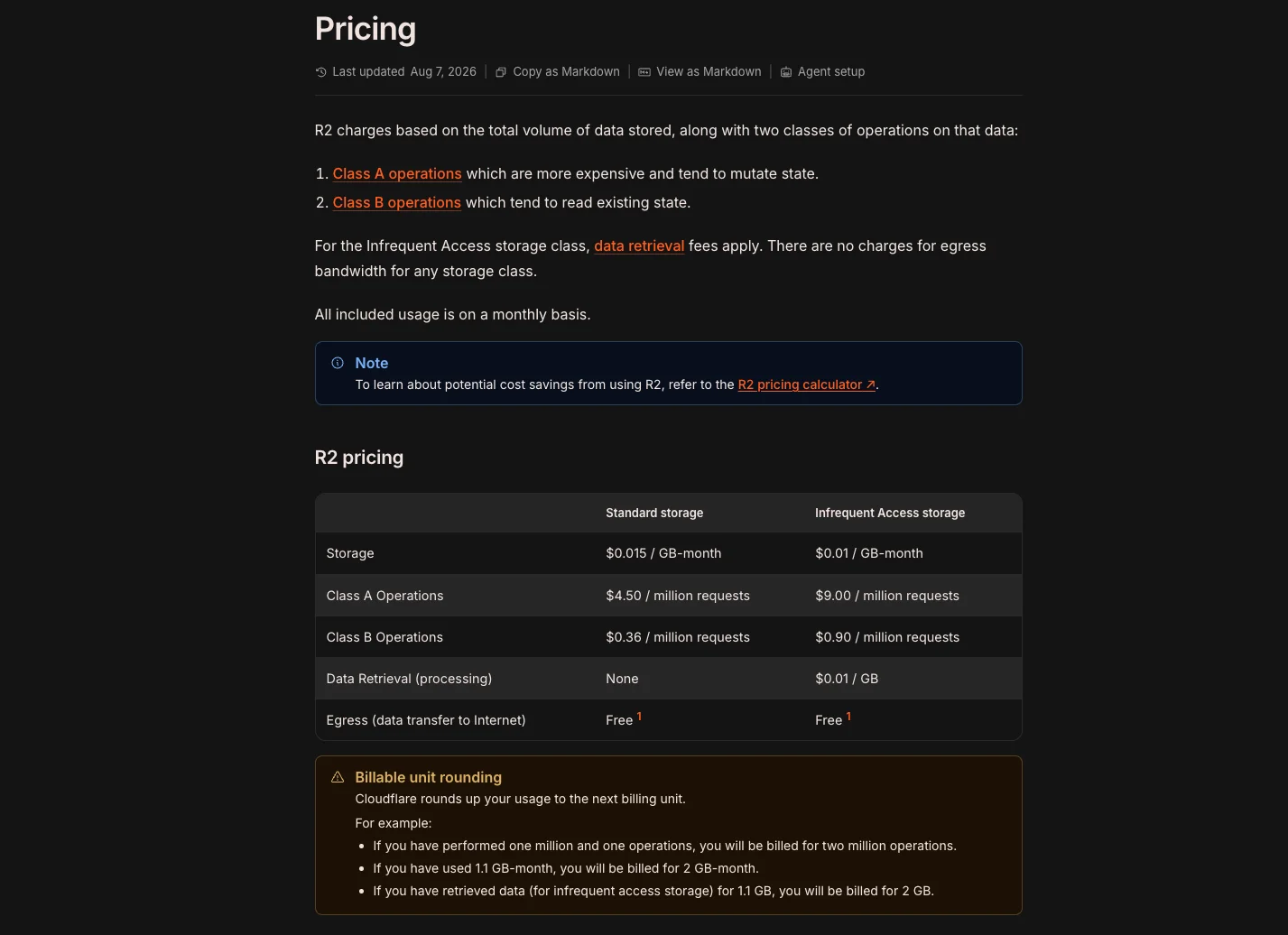
The one thing that sets R2 apart from other object storage is that there is no egress fee. You don't pay to pull data out, however much traffic you get.
That's true, and incomplete. There's an example in Cloudflare's own documentation. Storage cost zero, write cost zero, monthly bill $104.
Understanding where the bill comes from takes two concepts. But first, why R2 at all.
Why R2
On S3, storing data is cheap and pulling it out is not. You pay roughly 9 cents per gigabyte, and that cost grows with your traffic. The more people visit your site, the higher the bill, even though nothing changed in storage.
R2 doesn't have that line item. Not on the free tier, not on the paid one. Cloudflare's pricing page states it plainly: there are no egress bandwidth charges for any storage class.
The free tier is a usable size too. 10 GB of storage, 1 million write operations, 10 million read operations per month. And one detail matters: it resets monthly and never expires. The S3 free tier is 5 GB and lasts twelve months, after which you start paying. There's no clock running on R2.
For a sense of scale: a blog image converted to webp with its width capped comes out around 60 kilobytes. Hundreds of thousands of those fit in 10 GB. A personal site has to work fairly hard to push that limit.
Class A and Class B
You see these two terms in the dashboard and they don't explain themselves. They're simple.
Class A is writes. PutObject (uploading a file), CopyObject, ListObjects (listing bucket contents), multipart upload steps. $4.50 per million requests.
Class B is reads. GetObject (fetching a file), HeadObject (metadata only). 36 cents per million requests.
Deletes are free. DeleteObject and DeleteBucket fall into neither class.
That's a twelve-and-a-half times difference, because writes cost more to serve on the infrastructure side.
There's a trap here: listing is a write, not a read. Calling ListObjects to check whether a file exists is the expensive way to do it. HeadObject gets you the same answer at a twelfth of the price.
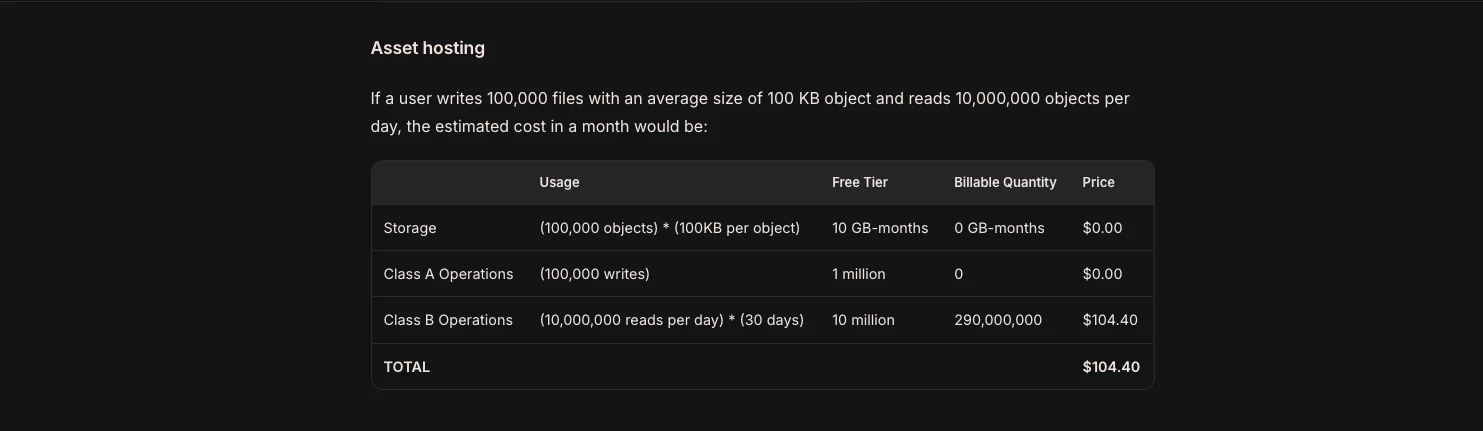
That $104 example from the top comes from exactly this. 100,000 files averaging 100 kilobytes, 10 million reads per day. Storage and writes come out at zero, but the reads count as Class B operations and that's where the bill appears.
So R2 doesn't remove the bill. It moves it from gigabytes to request counts. If you serve large files to many people, you win. If you serve a very high number of small requests to many people, you need to redo the math.
Setup
Creating a bucket takes minutes. The steps after it are the ones that matter.
Attach a custom domain. By default your files are served from something like pub-xxxxx.r2.dev. That works, but it means your site's images come from a different domain. In the Cloudflare dashboard you can attach your own subdomain in the bucket settings.
The thing to watch on the code side is keeping URL generation in one place. A single helper that reads the base address from an environment variable. If the domain changes, one line changes.
The upload path. Processing the image on your server before writing it to R2 is slower than uploading straight from the browser, but you keep control. A reasonable sharp setting: cap the width at 1600 pixels, don't enlarge, webp at quality 85.
Direct upload performs better, but it skips the webp conversion and the file type validation. If you want both of those on the server, the file has to go through the server.
Set Cache-Control. Send the header on upload: public, max-age=31536000, immutable. One year of caching, marked immutable. What makes that safe is generating file names from content, so a different file never shares a name. If that holds, the cache never goes stale.
Building a media library
If you're putting a screen in an admin panel that lists uploaded images, two decisions drive the cost.
Don't pull the list from R2. The obvious solution is calling ListObjectsV2 every time the screen opens. That's a Class A operation, the most expensive class, repeated on every open. Keep a record of each uploaded file in your own database and the list comes from there, with no request reaching R2 at all.
Block re-uploads by content hash. On upload, take the sha256 of the converted file and look it up in the database. If the same content was uploaded before, don't write a new file, return the existing address. That saves a Class A operation and a duplicate copy in storage.
Looking at content rather than filename matters. screenshot.png and Screenshot 2026.png can be the same image, and a name check misses it.
Three things people miss
Everything rounds up. Cloudflare rounds every measurement to the next billing unit. Use 1.1 GB-months and you're billed for 2. Perform one million and one operations and you're counted for two million. On small projects near the limit, that matters.
Storage isn't instantaneous. They take your daily peak and average it across 30 days. Uploading 5 GB one day and deleting it the next is not the same as holding 5 GB all month.
Unauthorized requests are free. You aren't billed for unauthorized requests to your bucket. Nobody can inflate your bill by flooding you with them.
Summary
For a personal blog the real appeal of R2 isn't that it's cheap. It's that the bill doesn't grow with traffic. If a post spreads further than you expected, your storage cost stays where it was.
Three things to get right at setup: attach a custom domain, set Cache-Control, and don't make R2 do your listing. All three can be fixed later, but doing them upfront is easier.
Available languages